The Forensic Screenshot: Transform screen captures into auditable evidence with chain of custody preservation
The definitive tool for collecting and preserving digital evidence with technical reliability, directly in your browser, aiding in compliance with ISO/IEC 27037
✔️ Full Metadata Capture: Generate PDFs with URL, date, time and browser information
✔️ Cryptographic Integrity: Absolute protection with SHA-256 Hashing
✔️ Immutable Time-Stamp: Register your evidence on Blockchain and time stamps (RFC 3161)
✔️ Browsing Recording: Record videos (WebM) or multi-page PDFs of your entire website interaction
✔️ Absolute Privacy: 100% local processing; no data or evidence ever leaves your computer
Why your "screenshot" needs the Evidence Collector?
Screenshot with Metadata
Each capture automatically records the URL, IP address, date, time, and browser information, providing the necessary context for admissibility.
Auditable Screenshot (Integrity)
Unlike a standard screenshot that can be edited, Evidence Collector generates a SHA-256 Hash at the exact moment of collection. If the file is altered, the hash changes and the fraud is detected.
Screenshot with Time-Stamping
Register your screenshot's hash on the Blockchain or via RFC 3161 time-stamping to prove that the evidence existed at that exact moment.
From click to evidence in 3 steps
Professional preservation with absolute simplicity
1. Install in your browser 📥
Add the extension to your browser in seconds. It integrates directly into your toolbar, ready to be activated whenever you need to record relevant digital content.
2. Access Your Tools 🔍
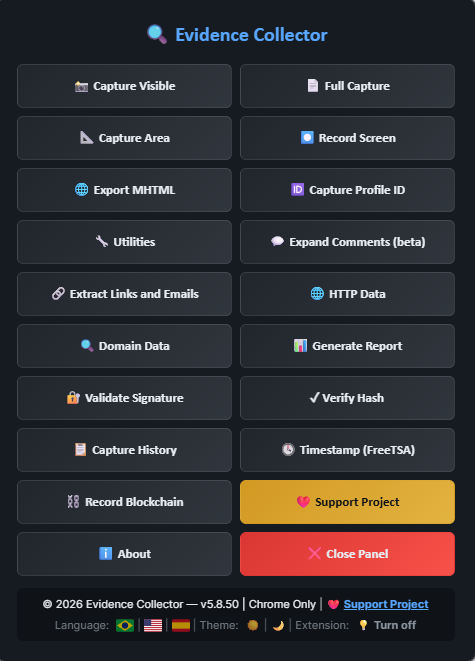
Click the Evidence Collector icon in your extension bar. An intuitive panel will open, giving you immediate access to all capture, recording, and data extraction tools.
3. Capture and You're Done! ✅
Choose the type of record you want to create. With just one click, the extension processes the evidence locally, automatically applying technical integrity standards such as SHA-256 Hashing and metadata.
💡 Configuration Tip: After the first installation, we recommend restarting your browser to ensure all high-performance resources are fully operational.
Features
Explore all Features!
📸 Capture Visible
Captures the visible area of the current page in high resolution and generates a PDF document with complete metadata (URL, date, time, browser). Each capture is accompanied by an integrity verification file (SHA-256 hash and digital signature) that allows subsequent verification that the evidence has not been tampered with
⏺️ Record Screen
🆔 Capture Profile ID
Starts real-time screen recording, capturing navigation video in WebM format with high-quality codec. Allows documenting complete interactions with web pages, including scrolling, clicks, and multimedia content playback. The recording captures exactly what is being displayed on the browser screen. Each generated file is accompanied by an integrity verification file (SHA-256 hash and digital signature)
Automatically extracts unique identifiers from social media profiles and online platforms. Important: The user must be logged into the social network or service and have the target profile's main page open. The feature identifies URL patterns and page elements to extract profile IDs from Facebook, Instagram, Twitter/X, LinkedIn, TikTok, YouTube, and other platforms
🌐 Open Multiple URLs
Allows opening multiple URLs automatically. The user enters a list of addresses (one per line) and the extension opens each URL in a new background tab. Useful for bulk verification or preparing multiple pages for evidence collection
💬 Expand Comments (beta)
🔗 Extract Links and Emails
Automatically expands all comments and replies on social media posts (Facebook, Instagram, TikTok, YouTube). The system detects the platform and applies pre-configured selectors to click buttons like "See more", "See all replies", and "Show replies". Allows automatic scrolling and interval configuration. Ideal for complete evidence collection on posts with many hidden comments. Includes visual selection mode for custom domains
Scans the current page and extracts all links (<a> elements) and email addresses found, presenting them in organized, separate lists. Links and emails can be individually copied to the clipboard. Displays the total count of links and emails found. Useful for documenting connections between pages, identifying external references, or mapping contacts during investigations
📊 Generate Report
Compiles all screenshots taken in the current session into a single structured PDF document, including index, complete metadata for each capture, and technical section on applied forensics methodology. The consolidated report also receives its own integrity verification file
🔐 Validate Signature
📥 Download WebM (beta)
Verifies the Evidence Collector signature of files generated by the extension. The user enters the SHA-256 hash and digital signature (obtained from the -hash.txt file) and the tool validates whether the signature matches the provided hash. This verification adds an extra layer of security that, together with the SHA-256 hash and other metadata, helps reinforce impartiality in the evidence collection process
When the extension is active, it automatically detects videos playing on the page and adds a floating "📥 Download WebM" button over each video. Clicking this button captures and saves the video content in high-quality WebM format, accompanied by an integrity verification file. Important: The capture takes the same time as the video playback in real-time for download. This feature is especially useful for preserving evidence of videos that may be removed or altered later
🕓 Timestamp (FreeTSA)
Adds temporal proof to hash verification files through the FreeTSA service (RFC 3161). The user selects the -hash.txt file generated by the extension, and the tool sends the SHA-256 hash to the FreeTSA service, receiving a digitally signed timestamp that proves the file existed at that specific moment. The timestamp file (.tsr) is saved along with the hash file, providing additional temporal proof for forensic and legal purposes
⛓️ Record Blockchain (OpenTimestamps)
📐 Capture Area
Creates immutable temporal proof using the Bitcoin blockchain through the OpenTimestamps protocol. The user selects the -hash.txt file generated by the extension, and the tool submits the SHA-256 hash to OpenTimestamps public calendars, which will later be recorded in a Bitcoin blockchain block. A .ots (OpenTimestamps proof) file is generated and saved. After a few days, this file can be verified to confirm that the evidence existed before the blockchain recording, providing internationally recognized temporal integrity proof
Allows selecting a specific screen area with the mouse and capturing it in high resolution. The capture generates a PDF document with the selected area and its metadata (URL, date, time, dimensions). Useful for highlighting specific elements without capturing unnecessary adjacent information. Includes integrity verification file (SHA-256 hash and digital signature).
🌐 Export MHTML
Exports the complete page in MHTML format (complete web file), preserving HTML, CSS, images, and embedded resources in a single file. All extension visual elements are removed before capture to ensure evidence purity. The generated MHTML file includes integrity verification via SHA-256 hash and digital signature. Note: This feature is only available in Chrome
✓ Verify Hash
🔍 Keyword Search
Compares file integrity by uploading the original file (PDF, WebM, MHTML, etc.) and its respective -hash.txt file. The tool calculates the SHA-256 hash of the uploaded file and compares it with the stored hash, confirming whether the file remains intact or was modified after capture. Displays additional information such as source URL and capture date, allowing complete evidence integrity verification
Allows searching for specific terms on the current page with support for regular expressions (regex). The tool highlights all found occurrences and allows navigation between results. Useful for quickly locating specific information on extensive pages, such as phone numbers, email addresses, URLs, or any text pattern. Supports JavaScript/ECMAScript regular expressions for advanced searches
📄 Full Capture
Performs automatic sequential captures of the page during scrolling, generating a multi-page PDF document with all visible content. The user can configure the scrolling speed (slow, medium, or fast) and the time interval between each capture (recommended: 1-5 seconds). Ideal for long pages such as timelines, news feeds, or extensive documents. Each capture records complete metadata and the generated file is accompanied by integrity verification (SHA-256 hash and digital signature)
📜 Auto Scroll
🕐 EPOCH Time Converter
Automatically scrolls the page to the bottom at configurable speed (slow, medium, or fast). A floating button allows stopping the scroll at any time. Useful for loading dynamic content (lazy loading), expanding infinite feeds, or preparing long pages for full capture. Scrolling stops automatically when reaching the end of the page
Converts UNIX timestamps (epoch time) to UTC date and time. Accepts values in seconds or milliseconds and automatically detects the format. Displays the result in two formats: UTC ISO 8601 and human-readable UTC. Useful for investigations involving log analysis, API metadata, or system records that use UNIX timestamp format
🌐 HTTP Data
🔍 Domain Data
Collects and displays technical data from the current page: HTTP response headers (Content-Type, Cache-Control, HSTS, CSP, X-Frame-Options, Referrer-Policy, X-Powered-By, Content-Encoding, ETag, Last-Modified, and more), TLS protocol and version, digital certificate (issuer, validity), server IP, redirects, charset, meta tags, page load performance (Navigation Timing), loaded resources (scripts, images, fonts), third-party scripts, iframes, registered service workers, forms, Web Storage keys (no values), and cookie metadata (no values). Copy all content or export as JSON with an integrity -hash.txt file.
Queries and displays public information about the current page's domain from four external sources: WHOIS/RDAP (full contact dump — registrant, administrative, technical, billing, and abuse — with nameservers, NS IP addresses, and DNSSEC details), Server Geolocation (all ipinfo.io fields: city, region, country, coordinates, provider, ASN, postal code, timezone, anycast), ASN Lookup (full autonomous system data: name, type, country, registry, prefix count, peers, upstreams, and downstreams), and DNS Lookup (A, AAAA, MX, NS, and TXT records with TTL and DNSSEC flag). The summary shows the responsible party's contact info and domain creation date. Copy or export everything as JSON with an integrity -hash.txt file.
🔐 Password Generator
Generates strong passwords with options for length (8 to 64 characters), inclusion of numbers and safe symbols. Passwords follow rules designed for use in systems and files: no spaces, avoid ambiguous characters (such as 0/O and 1/l), no accents, cedilla, or symbols that often cause problems in forms or on the command line. Useful for creating passwords for compressed files, accounts, and other uses that require a strong password compatible with different environments.
Compare Free and Pro versions of Evidence Collector
Annual
Monthly
Lifetime
⚖️ Technical Admissibility and Evidence Integrity
To ensure the integrity of the collection, Evidence Collector was developed based on two fundamental pillars:
1. Native Browser API: Screen captures and session recordings utilize native browser APIs and open-source libraries. This ensures that the generated evidence is a faithful representation of what the user was actually seeing and hearing on their screen at the time of collection.
2. Integrity Methodology (Hashing): For every generated file (PDF, WebM, etc.), the extension automatically calculates a SHA-256 cryptographic hash. This hash, which functions as a "digital fingerprint" of the file, is saved in a separate text file (-hash.txt). Any subsequent alteration to the evidence, however small, would change the hash, making tampering easily detectable. This method aligns with digital forensic best practices for ensuring integrity.
3. Technical Scope and Self-Authentication: Evidence Collector operates under the principle of self-authentication, recording content exactly as it is processed and displayed by the browser at the moment of interaction. It is essential to highlight the tool's operational limits:
No Active Protection: The extension does not function as an antivirus or security software.
Malicious Content: It does not have mechanisms to identify, block, or protect the system against viruses, malware, or malicious scripts.
Data Injection: The tool records what is displayed, including content that may have been maliciously injected into the page. The extension does not validate the source or security of the visited website's original source code.
Operator Responsibility: It is the sole responsibility of the user to ensure the integrity and security of their browsing environment before starting the evidence collection process.
Note: For a screenshot to hold technical weight in legal proceedings, it must be accompanied by guarantees that no manipulation occurred after capture. Evidence Collector acts as a faithful recording instrument, utilizing native browser APIs to ensure the screenshot is the exact representation of what was displayed at the time, following digital forensic best practices.
Frequently Asked Questions (FAQ)
What is Evidence Collector?
Evidence Collector is a digital tool developed for professionals who need to collect, document, and preserve evidence directly from their browser with total technical reliability. It acts as a "camera" for your browsing session, recording exactly what is displayed on the screen.
How does evidence integrity work?
Each capture or recording automatically generates an integrity verification file containing a SHA-256 cryptographic hash and a unique digital signature. This allows you to mathematically prove that the original content has not been altered since the moment of collection.
Is my privacy guaranteed?
Yes, absolutely. All processing, PDF and video generation, and metadata collection occur 100% locally in your browser. No browsing content or collected evidence is transmitted to external servers, ensuring total confidentiality for your investigations.
Does this screenshot have automatic legal validity?
The legal validity of any evidence is determined by the magistrate. Evidence Collector provides the professional with the technical requirements of integrity and preservation that courts demand for evidence to be admitted and considered reliable, following international digital forensic guidelines.
What types of content can I collect?
You can perform captures of specific areas, full pages (MHTML), screen recordings in WebM video, and even automated expansion of social media comments. The tool also allows you to extract unique profile identifiers and link lists for complete documentation.
Can I use it in any browser?
Currently, Evidence Collector is a solution for Chrome and Firefox (Desktop) browsers, utilizing native browser APIs to ensure the highest possible fidelity in capturing visual elements and page structures. Important: Due to Manifest V3 restrictions and the browser environment itself, in some scenarios, it may be necessary to refresh the page (F5), disable and re-enable the extension, or restart the browser for certain features to operate correctly.
🔍 Evidence Collector
©️2026